Disclaimer
Please note that on Windows computers, the TS5 Plus is only compatible with Thunderbolt 4, Thunderbolt 5, USB4 V1, and USB4 V2. The TS5 Plus must be connected to a Thunderbolt 4/5 or USB4 V1/2 Windows computer in order to use the dock’s USB-A ports and rear USB-C Data ports.
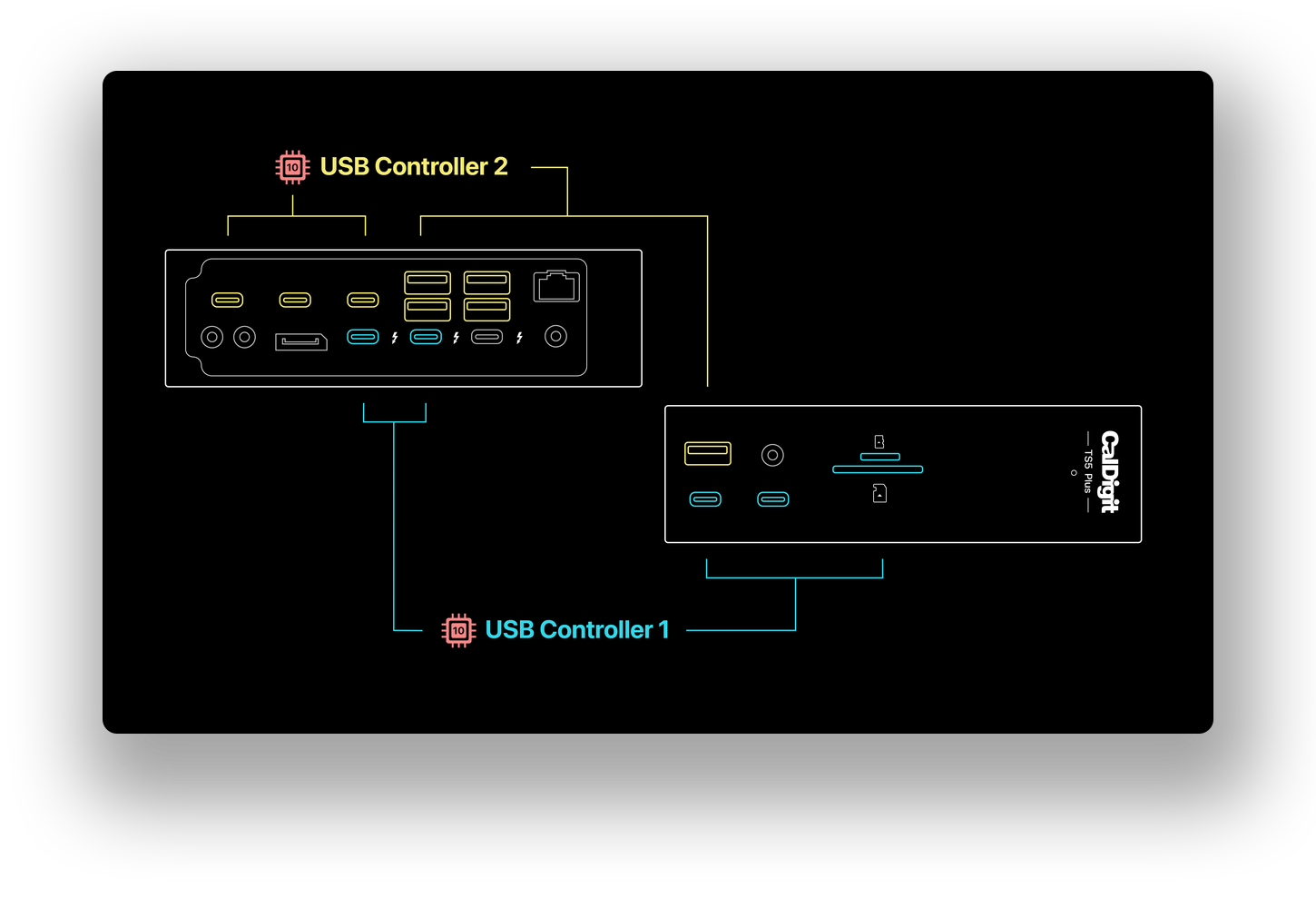
This requirement is due to the architecture of the TS5 Plus. These USB ports in particular are enabled by and require “PCIe Passthrough”, which is a feature that can only be found on Thunderbolt and USB4 ports. Windows computers that do not support Thunderbolt or USB4 may still work in some cases, but PCIe support will be disabled, meaning these USB ports and 10GbE will not work.
Troubleshooting
Since Thunderbolt 5’s release, many Windows PC manufacturers have released updates to improve Thunderbolt compatibility with the Thunderbolt 5 platform.
If you find that the USB ports on USB Controller 2 (pictured below) are not working with your TS5 Plus, please try the following:
- Update your computer’s BIOS to the latest version. BIOS updates may include PD and Thunderbolt/USB4 updates that can improve connectivity and compatibility with Thunderbolt 5 devices, such as the TS5 Plus.
- Update the Thunderbolt or USB4 drivers on your computer.
- Ensure that your computer is updated to the latest Windows 11 version.
- Ensure that PCIe over Thunderbolt/USB4 is Enabled. This setting can usually be found in the computer’s BIOS settings.
- Ensure you install the correct 10Gb Ethernet driver for the best compatibility.
Note: Some computers may not have the BIOS settings mentioned in Step 4. If your computer does not have this BIOS setting, please check with your computer manufacturer to see if your computer supports PCIe over Thunderbolt/USB4.