


Cosa distingue il TS5 Plus dagli altri?
20 Porte
80 Gb/s Bidirezionale
120Gb/s Boost Mode
4 Schermi
10GbE
Ricarica da 140W
20 Porte
80 Gb/s Bidirezionale
120Gb/s Boost Mode
4 Visualizza
10GbE
Ricarica da 140W
20 Ports
80Gb/s Bidirectional
120Gb/s Boost Mode
4 Displays
10GbE
140W Charging
Superare i limiti della connettività
A oltre dieci anni da quando la Thunderbolt Station originale ha ridefinito le possibilità di una singola connessione, la TS5 Plus si basa sulle generazioni precedenti per offrire l’esperienza di docking definitiva.
Alimentato dalla più recente tecnologia Thunderbolt 5, il TS5 Plus espande i flussi di lavoro su Mac e PC con la selezione di porte più avanzata mai inclusa in un dock Thunderbolt.

Docking.
Fatto come si deve.
Prestazioni a 80Gb/s
Oppure fino a 120Gb/s in modalità Bandwidth Boost
Quattro display sull'M5 Max
Quadruplica la tua produttività con M5 Max
Ricarica da 140W
Ricarica il tuo laptop o tablet più velocemente che mai
Prestazioni 10GbE
10 volte più veloce rispetto al tradizionale 1GbE
PCIe da 64 Gb/s per velocità SSD fulminee
Doppie prestazioni rispetto al PCIe da 32 Gb/s
Doppio controller USB
Il doppio della larghezza di banda per i dispositivi USB
PIÙ POTENZA. PIÙ PORTE.
La Thunderbolt Station ha sempre offerto molte porte, e il TS5 Plus non fa eccezione.
Con 20 porte utilizzabili contemporaneamente, il TS5 Plus supera i limiti della connettività.

TS5 Plus Unboxing & Overview
Funziona e basta
Il TS5 Plus è un dispositivo potente e per sfruttarne appieno le funzionalità è necessario un Mac o un PC con connettività Thunderbolt o USB4. Questo dock di nuova generazione è compatibile con Thunderbolt 5, Thunderbolt 4, Thunderbolt 3, USB4 v2 o dispositivi host USB4.
- M1/M2/M3/M4/M5 Pro, M1/M2/M3/M4/M5 Max & M1/M2/M3 Ultra Mac¹
- M1/M2/M3/M4/M5 Mac¹
- Thunderbolt 5 PC
- Thunderbolt 4 PC
- USB4 & USB4 v2 PC
- Intel Thunderbolt 3 Mac¹
- Thunderbolt iPad²
²La funzionalità dipende dalle capacità del computer o del tablet host.
Nota: il TS5 Plus non è compatibile con i PC Windows dotati di Thunderbolt 3.

*Poiché il TS5 Plus offre prestazioni elevate, i dispositivi host USB-C (5 Gb/s e 10 Gb/s) non sono compatibili. Per ottenere le massime prestazioni e funzionalità, è necessaria una connessione host Thunderbolt 5 da 80 Gb/s o USB4 v2.
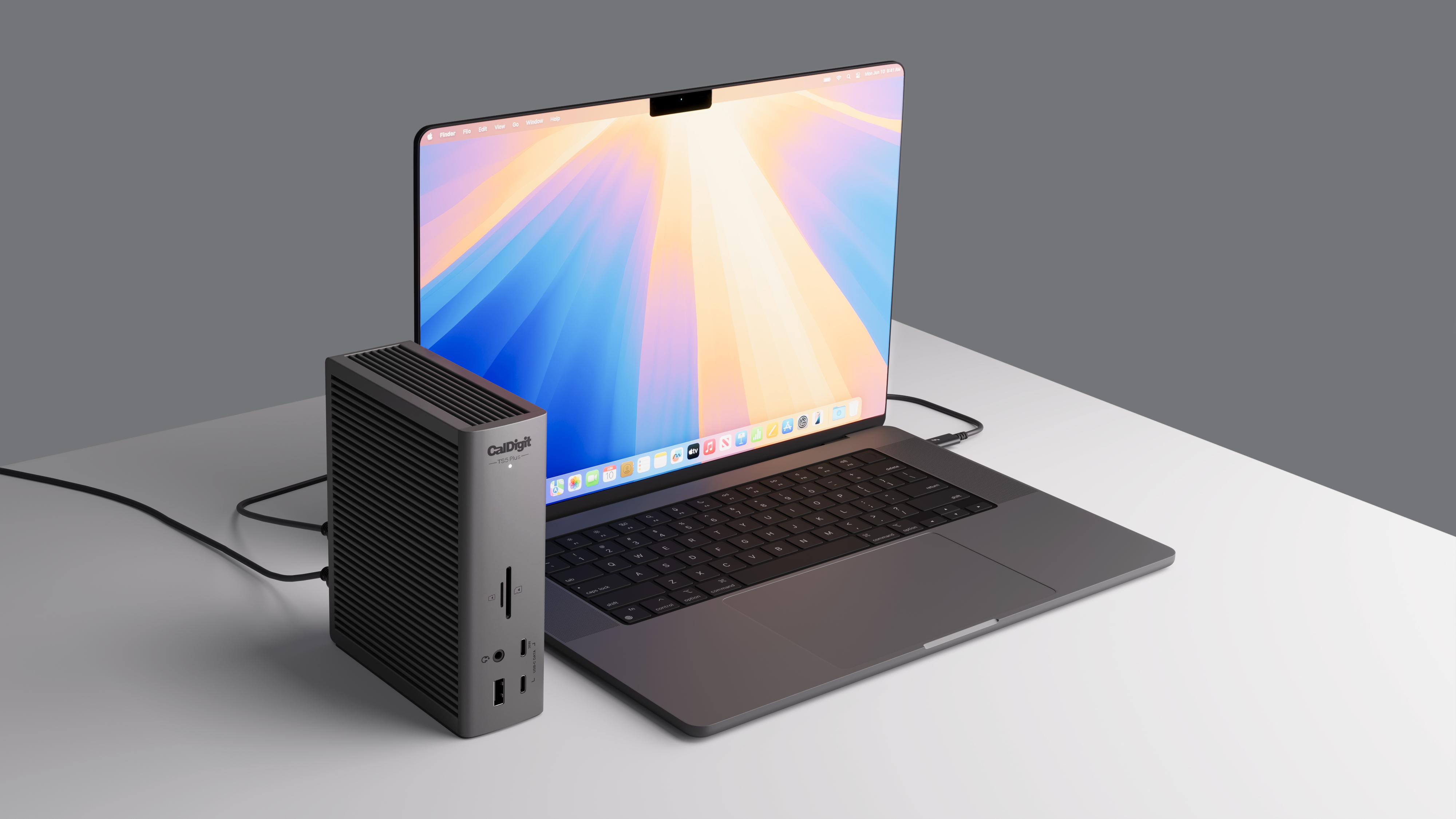
Alimentazione da 140W
Il TS5 Plus fornisce fino a 140W di potenza, ideale per i laptop più esigenti come il MacBook Pro da 16″ con chip M3/M4 Pro o Max che richiedono 140W.
Molti dock Thunderbolt 5 dichiarano di offrire una certa potenza, ma spesso includono un’alimentazione insufficiente. La potenza viene distribuita tra i dispositivi connessi, riducendo così l’erogazione effettiva.
Stai tranquillo: l’alimentazione del CalDigit TS5 Plus fornirà sempre i 140W completi, senza mai ridurre le prestazioni anche con dispositivi aggiuntivi collegati.
Per laptop o tablet che richiedono meno di 140W, il TS5 Plus fornirà solo la potenza necessaria al dispositivo.
| Dock | Laptop Charging |
|---|---|
|
TS5 Plus |
140W |
|
TS5 |
140W |
|
TS4 |
98W |
10 potenti porte USB
Con 10 porte USB sul TS5 Plus, tra USB-A e USB-C, hai tutta la connettività necessaria per i tuoi accessori USB*.
Tutte le porte USB del TS5 Plus offrono 10 Gb/s di prestazioni e 7,5W di potenza (esclusa la porta USB-C frontale da 36W).
*Le porte USB-C e USB-A sono solo per i dati. I monitor devono essere collegati alle porte Thunderbolt 5/USB4 v2 libere.


Doppio controller USB
Il TS5 Plus è un dispositivo unico, dimostrato dal fatto che è l’unico dock con due controller USB*.
I dock Thunderbolt tradizionali dispongono di un solo controller USB condiviso tra tutte le porte. Il TS5 Plus invece include due controller indipendenti da 10 Gb/s, garantendo più larghezza di banda per i dispositivi collegati – la soluzione perfetta per chi utilizza molti dispositivi USB ad alta velocità.
*Il secondo controller USB è supportato solo da host Thunderbolt e host USB4 che supportano PCIe. Contatta il produttore del tuo host USB4 per informazioni sul supporto PCIe.
36W per gli accessori
Il TS5 Plus è un dispositivo unico che, grazie alla porta USB-C frontale da 36W, offre una soluzione potente e comoda, ideale anche per i dispositivi USB-C più esigenti.
Non solo la porta USB-C frontale fornisce 36W, ma anche le due porte Thunderbolt 5 disponibili. Le generazioni precedenti offrivano solo 15W. Il TS5 Plus ha più che raddoppiato questa potenza per alimentare ancora meglio i tuoi dispositivi.
36W sono più che sufficienti anche per l’iPad Pro, che si carica a 20W.
| Device | Charging Rate |
|---|---|
|
iPhone 16 Pro Max |
36W |
|
iPad Pro 13″ |
36W |
|
Vision Pro Battery |
36W |
|
Apple Watch |
18W |


Thunderbolt 5
Il TS5 Plus è dotato di porte Thunderbolt 5 bidirezionali da 80 Gb/s, il doppio delle prestazioni del Thunderbolt 4.
Le prestazioni PCIe delle porte Thunderbolt sono raddoppiate rispetto alla generazione precedente, arrivando a 64 Gb/s PCIe 4.0. Ideale per SSD o RAID ad alte prestazioni, con velocità di trasferimento fino a 6.200 MB/s.
| TS5 Plus | TS4 | |
|---|---|---|
|
Prestazioni massime per l’archiviazione esterna |
Up to 6,200MB/s |
3,200MB/s |
|
Differenza di prestazioni |
2x Faster |
2x Slower |
SEMPRE ICONICO
Nel 2015, CalDigit ha introdotto per la prima volta l’iconico design orizzontale e verticale per innovare e adattarsi a una varietà di flussi di lavoro. Con il feedback della nostra community, abbiamo continuato a perfezionare questa scelta stilistica, diventata sinonimo della linea Thunderbolt Station.
Anche se altri dispositivi possono assomigliare al TS5 Plus, in CalDigit c’è un solo concetto originale: ascoltare i nostri clienti.
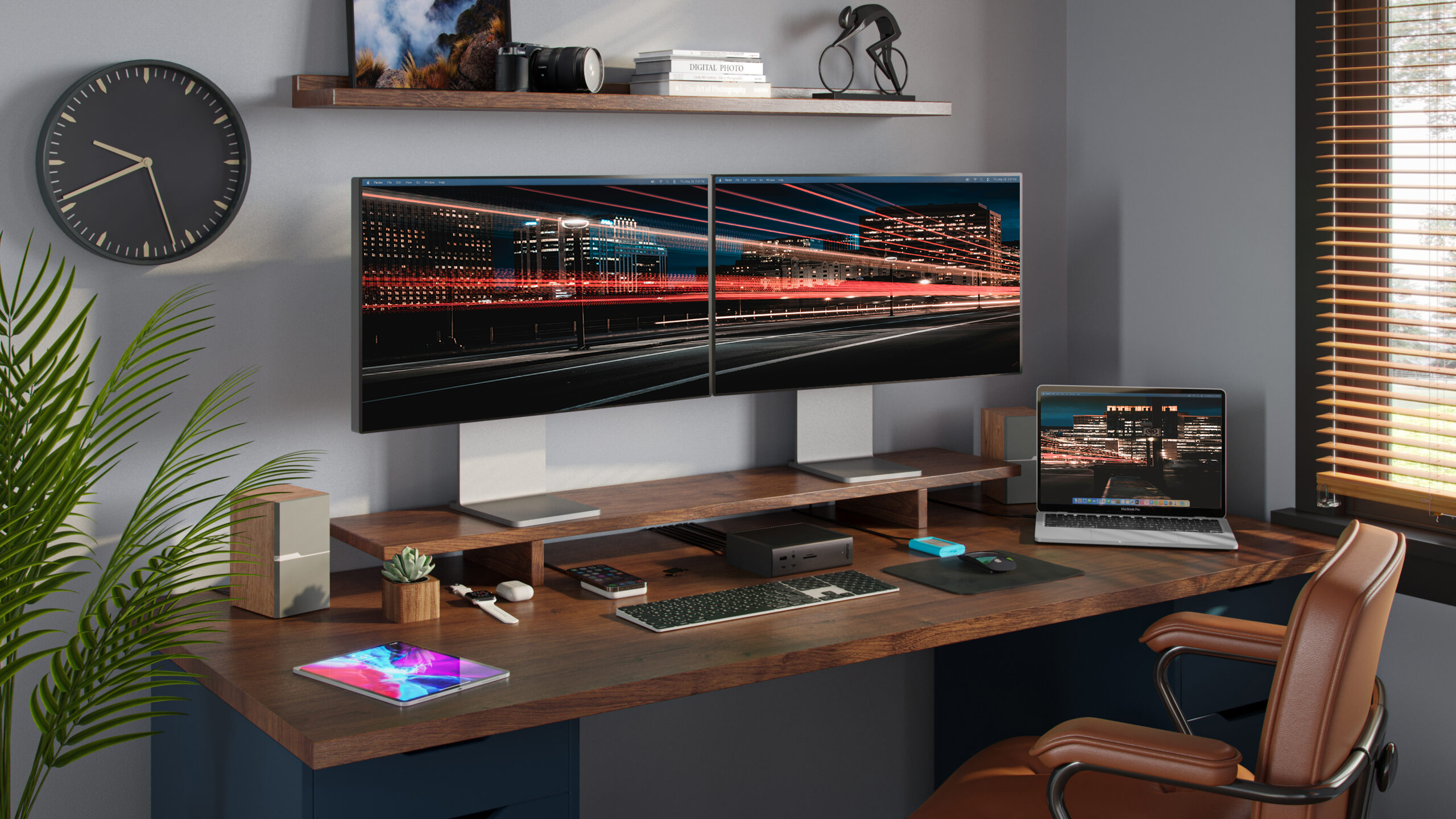
Schermi singoli, doppi, tripli e quadrupli
Che tu abbia bisogno di un display ad alta risoluzione, di un display con frequenza di aggiornamento elevata o di collegare fino a 4 display esterni, il TS5 Plus è la soluzione ideale.
Schermo singolo
Se desideri collegare un singolo monitor, puoi usare una delle porte Thunderbolt 5 libere o il connettore DisplayPort. Per un monitor HDMI, usa un adattatore USB-C a HDMI o un adattatore DisplayPort attivo a HDMI.***
Due schermi
- Gli utenti macOS con Mac basati su M5, M4, M1/M2/M3/M4 Pro, M1/M2/M3/M4 Max, M1/M2/M3 Ultra o Intel possono collegare fino a due monitor.
- I Mac con chip M1/M2/M3 supportano solo un monitor esterno per limitazione progettuale.
- I PC Windows con Thunderbolt 5 o 4 possono collegare fino a due monitor.
Tre monitor
- Gli utenti macOS su M1-M4 Pro / Max non supportano tre monitor tramite una docking station Thunderbolt.
- Gli utenti macOS con M5 Max e M5 Pro possono collegare fino a tre display.
- I PC Windows con Thunderbolt 5 possono collegare fino a tre monitor su computer host compatibili.
- I PC Windows con Thunderbolt 4 non supportano nativamente tre monitor.
Quad monitor
- Gli utenti macOS con M5 Max possono collegare fino a quattro display.
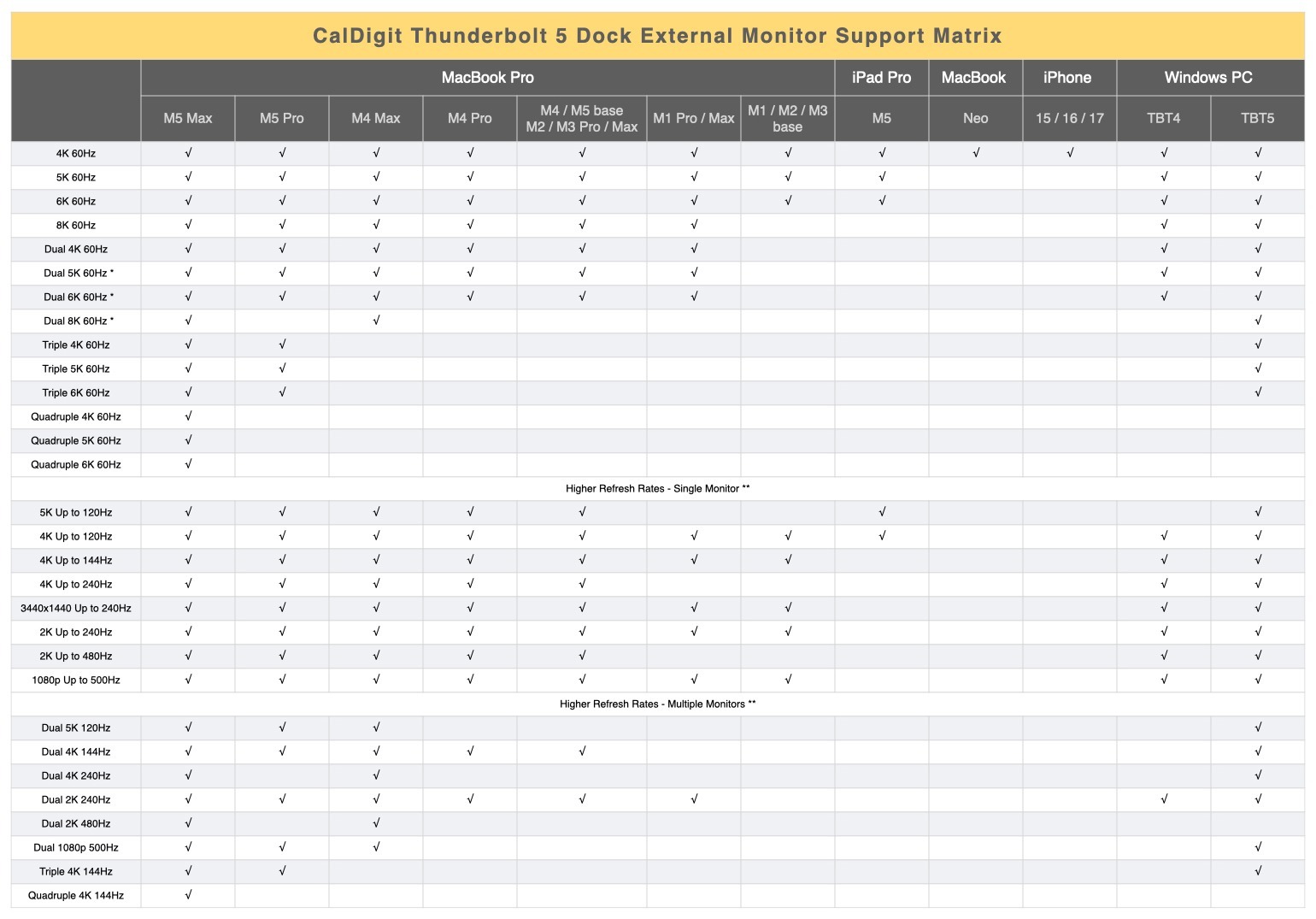
* I monitor 5K doppi devono essere Thunderbolt 4 o Apple Studio Display. I monitor LG UltraFine 5K doppi non sono supportati a meno che il computer host non sia un Mac M5 Max. I monitor 6K possono essere monitor Thunderbolt 4, Apple Pro Display XDR o Studio Display XDR. Il supporto DSC (Display Stream Compression) è necessario per le risoluzioni 6K e 8K.
** Frequenze di aggiornamento più elevate (superiori a 60 Hz) potrebbero richiedere il supporto DSC (Display Stream Compression) sui monitor e sulla GPU host. La profondità di colore/bit può variare per supportare frequenze di aggiornamento più elevate.
*** Alcuni MacBook con chip M3, come il MacBook Air, possono supportare due monitor esterni fino a 5K e 6K quando il coperchio del portatile è chiuso (modalità a conchiglia).
**** I Mac con chip M1 supportano solo HDMI fino a 2.0b. A seconda della configurazione, i Mac con processore M2/M3/M4/M5 possono supportare fino a HDMI 2.1 tramite le porte Thunderbolt se utilizzano macOS 26 o versioni successive e un adattatore come l’adattatore CalDigit da USB-C a HDMI 2.1. Per frequenze di aggiornamento superiori, è possibile utilizzare anche una connessione da USB-C a USB-C, da USB-C a DisplayPort o da DisplayPort a DisplayPort. Per ulteriori informazioni sul supporto di monitor esterni su Mac, visitare https://support.apple.com/en-us/101571 e https://www.caldigit.com/macbook-multiple-monitor-support-with-caldigit-thunderbolt-docks/
***** I risultati possono variare a causa degli aggiornamenti del sistema operativo. Per la compatibilità di monitor esterni tramite una singola connessione Thunderbolt su diversi computer Windows, consultare il sito Web del produttore.
Prestazioni bidirezionali da 80Gb/s e modalità Boost da 120Gb/s
L’ultima versione di Thunderbolt ha raddoppiato la larghezza di banda rispetto alla generazione precedente, consentendo una trasmissione fino a 80 Gb/s in entrambe le direzioni. Questa potenza senza pari conferisce al TS5 Plus prestazioni eccezionali nel trasferimento di file, rendendolo la soluzione ideale per dispositivi di archiviazione ultra-rapidi.
Le prestazioni di Thunderbolt 5 sono dinamiche: si adattano in tempo reale alle esigenze del tuo flusso di lavoro. Il TS5 Plus passa dalla trasmissione bidirezionale a 80 Gb/s alla modalità “Bandwidth Boost”, capace di offrire fino a 120 Gb/s per supportare monitor ad alte prestazioni. Se il tuo monitor richiede maggiore potenza, Thunderbolt 5 la fornisce automaticamente, senza che l’utente debba preoccuparsene. È semplicissimo.
Grazie a questa straordinaria versatilità, il TS5 Plus supporta risoluzioni fino a 8K, configurazioni a quattro monitor (su computer compatibili) e frequenze di aggiornamento elevatissime: un insieme di funzionalità che solo Thunderbolt 5 è in grado di offrire.
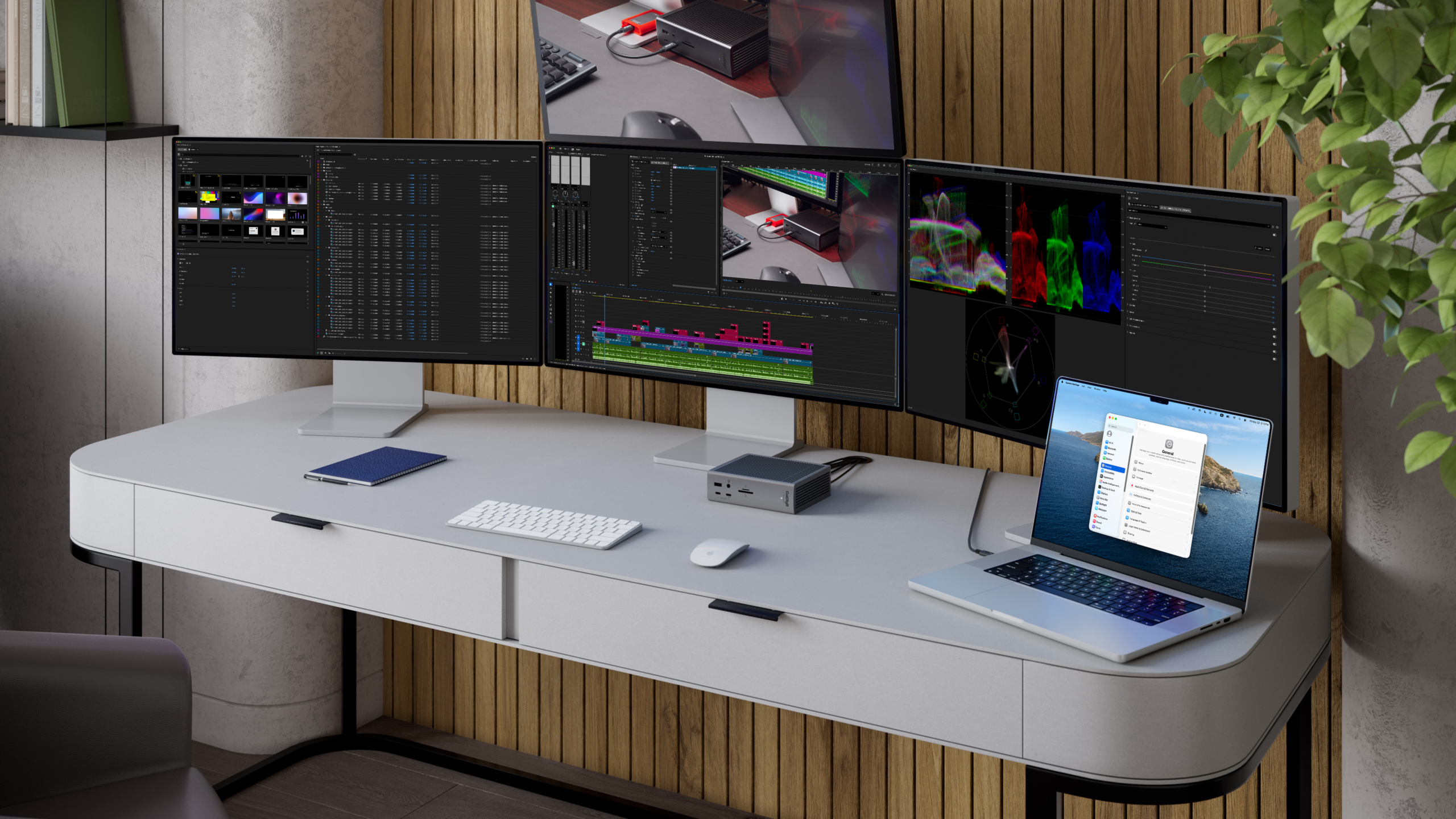
È possibile collegare tre o quattro schermi.
Thunderbolt 5 consente di collegare fino a 3 monitor esterni a un computer host Thunderbolt 5 che supporta 3 display, come ad esempio l’ultimo MacBook Pro M5 Pro. Collega due monitor alle porte Thunderbolt 5 downstream e un monitor al connettore DisplayPort. Con il modello M5 Max, il TS5 Plus può supportare fino a 4 monitor con una singola connessione Thunderbolt 5*.
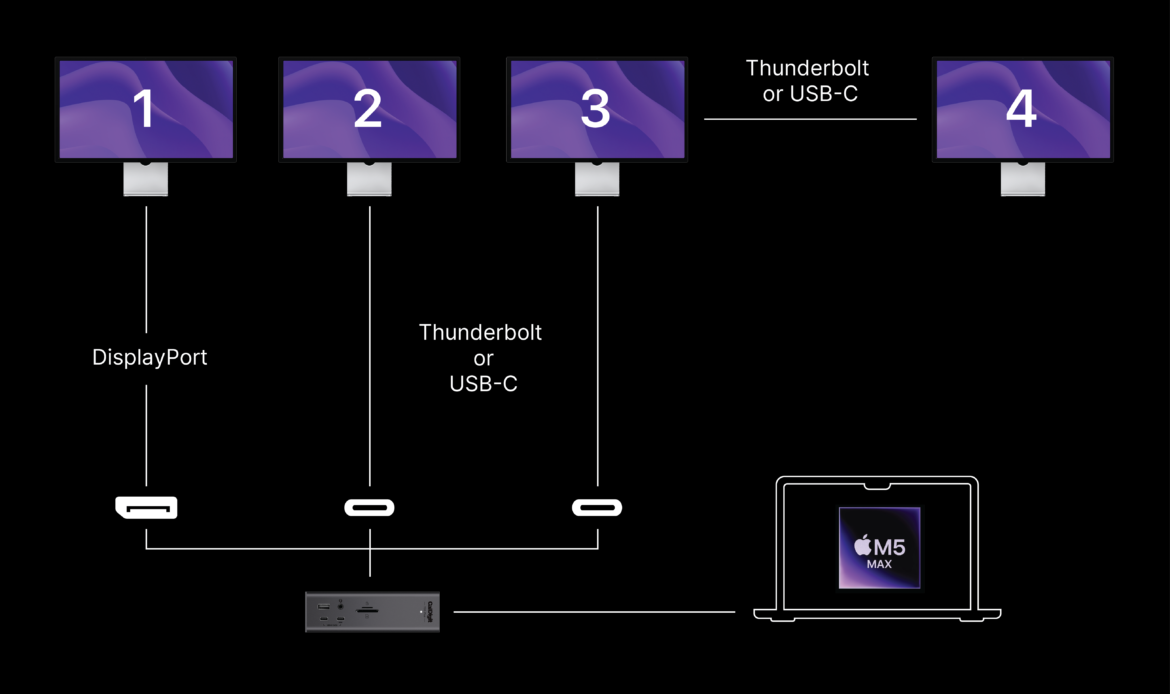
*La configurazione a tre schermi richiede un Mac M5 Pro o M5 Max compatibile oppure un host Windows Thunderbolt 5. I Mac Apple M4 non supportano la configurazione a tre schermi tramite una singola connessione host Thunderbolt 5. I computer host Windows o Mac con Thunderbolt 4 non supportano la configurazione a tre schermi. L'M5 Max può supportare fino a 4 schermi tramite il TS5 Plus, e uno degli schermi deve essere un display Thunderbolt collegabile in cascata.
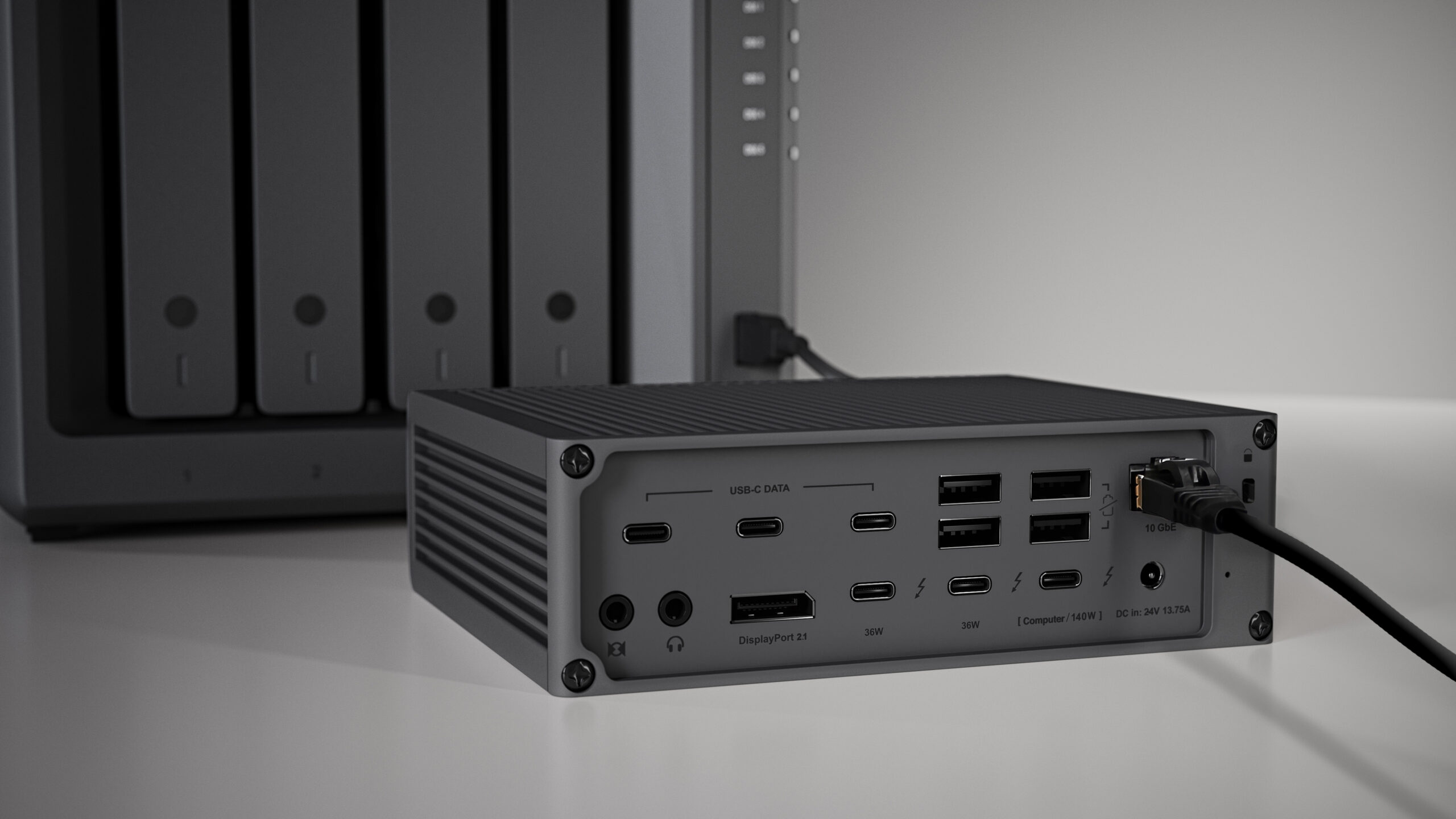
Ethernet 10 Gigabit
Il CalDigit TS4 è stato il primo dock Thunderbolt 4 con porta 2.5 GbE. Con il TS5 Plus andiamo oltre, includendo una porta 10 GbE.*
L’Ethernet da 10 Gb offre prestazioni 10 volte superiori rispetto al tradizionale 1 GbE, con velocità fino a 10 miliardi di bit al secondo.
In passato, per usare 10 GbE con un laptop era necessario un adattatore Thunderbolt esterno. Ora è integrato nel TS5 Plus, risparmiando tempo e spazio. È compatibile anche con dispositivi 5 GbE, 2.5 GbE e 1 GbE.
Ideal For
- 10Gb/s NAS Connection
- 10Gb/s Internet Connection
- 10Gb/s Host Server
*Ethernet è supportato solo su host Thunderbolt e host USB4 che supportano PCIe. Contatta il produttore del tuo host USB4 per informazioni sul supporto PCIe.
Tablet
Collega il TS5 Plus al tuo iPad Thunderbolt o al tablet Windows Thunderbolt per portare il tuo flusso di lavoro a un livello superiore.
*Non compatibile con tablet USB-C. La funzionalità completa dipende dalle capacità del tablet. Le funzionalità sono limitate quando si usa un tablet o uno smartphone come host.

SD & microSD 4.0 UHS-II
Il TS5 Plus ha lettori di schede SD e microSD sul pannello frontale per un accesso facilitato. Entrambi i lettori supportano lo standard UHS-II e possono essere utilizzati simultaneamente.


Rear Host Port
La maggior parte dei dock Thunderbolt generici presenta la porta host anteriore, causando disordine nei cavi.
La porta host posteriore del TS5 Plus offre una soluzione elegante per un ambiente di lavoro ordinato.
Apple SuperDrive
Apple consiglia di collegare dispositivi come il SuperDrive direttamente al laptop per via del consumo energetico. CalDigit ha sviluppato un driver che consente di collegare il SuperDrive direttamente al TS5 Plus.
*È necessaria un’installazione unica del driver.


Offline Charging
La porta USB-A frontale, tutte le porte USB-C e due porte USB-A posteriori del TS5 Plus supportano la ricarica offline.
Questa funzione consente di caricare dispositivi USB come telefoni e tablet anche quando il TS5 Plus non è collegato a un host.
- Apple Watch
- iPad Pro 13″
- Camera
- Magic Mouse
- MacBook Pro 16″
- MacBook Air 15″
- Vision Pro Battery
- AirPods Max
- Wireless Charger
- iPhone 16
- AirPods
Docking Station Utility
Disconnettere manualmente tutte le unità esterne da un dock può risultare scomodo.
CalDigit fornisce un’utilità gratuita per macOS che consente di scollegare tutte le unità esterne con un solo clic.*
*È necessaria un’installazione una tantum. Solo per macOS.

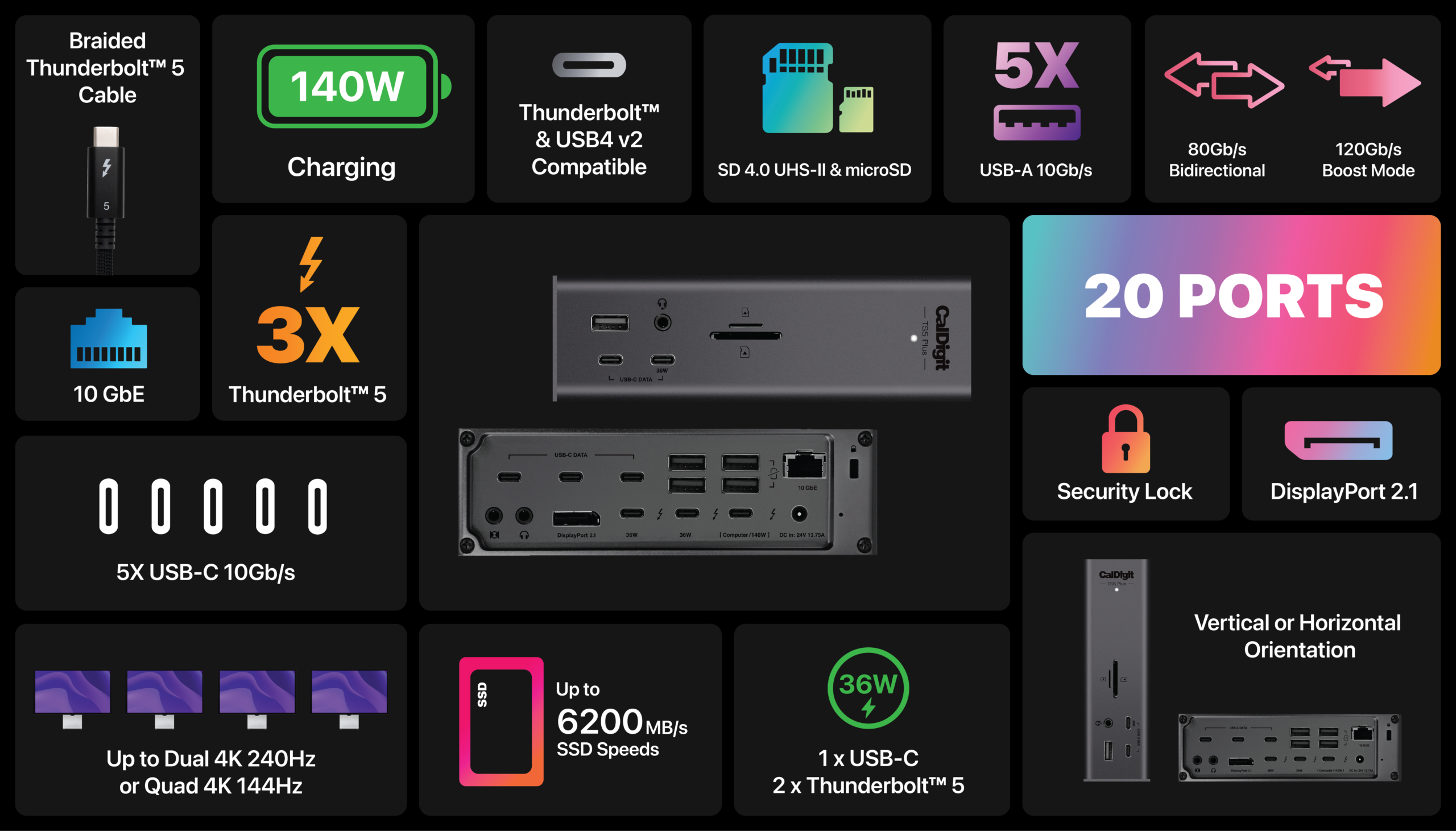

- Specifiche Tecniche
- Compare TS4, TS5 & TS5 Plus
- FAQ
Interfaz
- 1 x Thunderbolt 5 Host Port (Up to 120Gb/s)
- 2 x Thunderbolt 5 Downstream Ports (80Gb/s)
- 5 x USB-C (10Gb/s)
- 5 x USB-A (10Gb/s)
- 1 x DisplayPort 2.1
- 1 x SD 4.0 (UHS-II)
- 1 x microSD 4.0 (UHS-II)
- 1 x 10 Gigabit Ethernet
- 1 x Front Combo Audio In/Out (3.5mm)
- 1 x Rear Audio Out (3.5mm)
- 1 x Rear Audio In (3.5mm)
- 1 x DC In (24V 13.75A)
Requisiti minimi di sistema
- Mac:
- macOS 15 or newer
- Thunderbolt 3 or newer
- Windows:
- Windows 11 or newer
- Thunderbolt 4 or newer
- Intel 12th Gen Processor or newer
- Thunderbolt NVM Firmware 43.3 or newer
- USB4 or USB4 v2 Computer
- PCIe Tunneling support required
- Thunderbolt/ USB4 iPad
Alimentazione
- Thunderbolt 5/USB4 Host Port: Up to 140W
- Each Downstream Thunderbolt 5/USB4 Port: 36W
- Front 36W USB-C Port: 36W
- Remaining USB-C Ports: 7.5W
- USB-A Ports: 7.5W
Dimensioni e peso
- Height: 6.10” (155.0mm)
- Width: 1.85” (47.0mm)
- Length: 5.03” (127.9mm)
- Weight: 1.98 lbs (0.90kg)
Contenuto della confezione
- 1 x CalDigit TS5 Plus
- 1 x Thunderbolt 5 Braided Cable (1.0m)
- 2 x Rubber Feet Strips
- 1 x Power Cord
- 1 x Power Supply (330W)
Garanzia
- 2 Years
| TS4 | TS5 | TS5 Plus | |
|---|---|---|---|
|
Color |
Space Gray |
Space Gray |
Space Black |
|
Bandwidth |
40Gb/s |
80Gb/s Bidirectional |
80Gb/s Bidirectional |
|
Bandwidth Boost Performance |
– |
120Gb/s |
120Gb/s |
|
No. Ports |
19 |
15 |
20 |
|
Host Charging |
98W |
140W |
140W |
|
Max. PCI Express Bandwidth |
32Gb/s |
64Gb/s |
64Gb/s |
|
Three 4K 144Hz Displays (on M5 Pro, M5 Max, or supported Thunderbolt 5 Windows PCs) |
X |
✓ |
✓ |
|
Quad 4K 144Hz Displays (on M5 Max) |
X |
✓ |
✓ |
|
Dual 6K 120Hz Displays (on M5 Max) |
X |
✓ |
✓ |
|
Thunderbolt Ports |
3 x 40Gb/s |
4 x 80Gb/s |
3 x 80Gb/s |
|
Thunderbolt Downstream Port Charging |
15W |
15W |
36W |
|
USB 2.0 USB-A |
X |
1x |
X |
|
USB 3.2 10Gb/s USB-A |
5x |
2x |
5x |
|
USB 3.2 10Gb/s USB-C |
3x |
3x |
5x |
|
Dual USB 10Gb/s controllers |
X |
X |
✓ |
|
Front 20W USB-C Port |
✓ |
✓ |
X |
|
Front 36W USB-C Port |
X |
X |
✓ |
|
Supports USB 20Gb/s Data Path (On Supported Thunderbolt 5 Windows PCs) |
X |
✓ |
✓ |
|
DisplayPort Interface |
1x |
X |
1x |
|
DisplayPort Version |
1.4 |
2.1 |
2.1 |
|
Ethernet (PCIe base) |
2.5GbE |
2.5GbE |
10GbE |
|
Chassis Dimension |
5.55” x 1.65” x 4.46” |
5.55” x 1.65” x 4.46” |
6.10” x 1.85” x 5.03” |
|
Power Supply |
230W |
240W |
330W |
|
Price |
$379.99 |
$399.99 |
$499.99 |
macOS 15 and above.
Windows 11 and above.
No. The TS5 is only compatible with Thunderbolt 5, Thunderbolt 4, Thunderbolt 3, USB 4 v2, or USB4 host devices. It is not compatible with 5Gb/s or 10Gb/s USB-C host devices.
Yes, the TS5 Plus is compatible with Thunderbolt 4 Macs and Windows PCs. However, the TS5 Plus is only compatible with Thunderbolt 3 Macs. It is not compatible with Thunderbolt 3 Windows PCs. Users on Thunderbolt 4 or Thunderbolt 3 host computers will see reduced functionality due to the fact that those versions of Thunderbolt provide half the performance of Thunderbolt 5.
Yes, the TS5 Plus is the perfect companion for the above Apple Silicon Macs.
Base M1-M3 Macs only support a single display through the Thunderbolt connection.
M1-M4 Pro, M1-M4 Max, M4, M5 base, and Ultra Mac users can connect dual displays to the TS5 Plus.
Three displays are supported through a CalDigit Thunderbolt 5 dock or hub on M5 Pro.
Four displays are supported through a CalDigit Thunderbolt 5 dock or hub on M5 Max.
Yes, the TS5 Plus works with computers that are USB4 or USB4 v2, and can support PCIe over USB4.
A new feature of Thunderbolt 5 is called Bandwidth Boost, and it allows the TS5 Plus to allocate more performance when you connect bandwidth intensive displays to the dock, such as high-refresh rate displays, or multiple high-resolution displays. It will allocate up to 120Gb/s to the displays, and leave 40Gb/s for the rest of the dock.
Option 1 (DisplayPort Monitor)
Directly connect a DisplayPort monitor to the DisplayPort connector.
Or
Connect a USB-C to DisplayPort Video Adapter (sold separately) to one of the spare Thunderbolt 5 ports.
Option 2 (Thunderbolt Monitor)
Directly connect a Thunderbolt monitor to one of the spare Thunderbolt 5 ports on the TS5 Plus.
Option 3 (USB-C Monitor)
Directly connect a USB-C monitor to one of the spare Thunderbolt 5 ports on the TS5 Plus.
Option 4 (HDMI Monitor)
Add an Active DisplayPort to HDMI Adapter (sold separately) to the DisplayPort connector.
Or
Connect a USB-C to HDMI Video Adapter (sold separately) to one of the spare Thunderbolt 5 ports.
Option 1
– Connect one monitor to the DisplayPort connector.
– Connect the second monitor to one of the spare Thunderbolt 5 ports via USB-C Video Adapter (sold separately).
Option 2
– Connect one monitor to one of the spare Thunderbolt 5 ports via a USB-C Video Adapter (sold separately).
– Connect the second monitor to one of the spare Thunderbolt 5 ports via a USB-C Video Adapter (sold separately).
Option 3
– Connect two USB-C or Thunderbolt monitors directly to two of the Thunderbolt 5 ports.
Three displays requires a MacBook Pro with M5 Pro or M5 Max or a Thunderbolt 5 Windows PC that supports triple displays.
– Connect one monitor to the DisplayPort connector.
– Connect the second monitor to one of the spare Thunderbolt 5 ports via a USB-C Video Adapter (sold separately), or directly connect a USB-C or Thunderbolt monitor to one of the spare Thunderbolt 5 ports.
– Connect the third monitor to one of the spare Thunderbolt 5 ports via USB-C Video Adapter (sold separately), or directly connect a USB-C or Thunderbolt monitor to one of the spare Thunderbolt 5 ports.
Four displays requires a MacBook Pro with M5 Max that supports quadruple displays.
– Connect one monitor to the DisplayPort connector.
– Connect the second monitor to one of the spare Thunderbolt 5 ports via a USB-C Video Adapter (sold separately), or directly connect a USB-C or Thunderbolt monitor to one of the spare Thunderbolt 5 ports.
– Connect a daisy-chainable Thunderbolt monitor to one of the spare Thunderbolt 5 ports.
– Connect the forth monitor to the downstream Thunderbolt port on the 3rd monitor via a USB-C Video Adapter (sold separately), or directly connect a USB-C or Thunderbolt monitor.
If less than all of the 4 monitors connected to your M5 Max through the TS5 Plus are working, this may mean some or all of the monitors are not utilizing their display connection efficiently, which may impact the other monitor’s capabilities. While not definitive, to achieve up to 4 displays at once, the individual monitors would need to be 4K144Hz, 5K75Hz, 6K60Hz, or lower. Any monitors above these resolutions or refresh rates may impact the capabilities of other displays. Monitors within or below these targets will not necessarily work.
Yes, you can directly connect the Apple Pro Display XDR or Studio Display XDR to one of the spare Thunderbolt 5 ports and output at full 6K resolution.
140W.
The two downstream Thunderbolt 5 ports charge at 36W each.
Yes, if your laptop charges at less than 140W, the TS5 Plus will only supply the amount of power your laptop requires.
If your are using a Mac mini, iMac, or desktop computer the TS5 Plus will not supply power via the Thunderbolt 5 connection.
Yes, you can use all the ports on the TS5 Plus at the same time.
The front 36W USB-C port is ideal for use with USB-C devices that require more power, such as the iPhone 16 Pro Max that charges at up to 36W.
Yes, both card readers can be use at the same time.
No. When two audio outputs are connected, the system will default to the front audio output. You can only use one audio output at a time.
For the optimal compatibility we recommend to use certified 80Gb/s Thunderbolt 4 cables with 240W power delivery.

 Canada
 México
 Brazil


 Amazon.mx